
Steam Deck OLED vs. ASUS ROG Ally X: Which Should You Buy?
Deciding between Valve's Steam Deck OLED and the ASUS ROG Ally X? We break down performance, screen quality, battery life, and software differences.

Quick answer: Choose the Steam Deck OLED for a simple, console-style interface, top-tier contrast, lower price, and great power efficiency in indies and moderate titles. Choose the ASUS ROG Ally X if you want to play games requiring kernel-level anti-cheat, access Xbox Game Pass natively, or run modern AAA titles at higher frame rates and 1080p resolution.
Handheld gaming PCs have matured into full-fledged alternatives to consoles and desktop gaming rigs. However, picking between Valve's Steam Deck OLED and ASUS's ROG Ally X comes down to a fundamental trade-off: software simplicity versus raw Windows power.
While both devices let you take your PC library on the go, they handle display technology, battery size, game launchers, and daily maintenance in completely different ways. Matching their technical differences to your favorite games is the fastest way to avoid buyer's remorse.
Key takeaways
- Software friction: SteamOS offers effortless sleep/wake and background updates, whereas the ROG Ally X runs Windows 11 Home with the Xbox Full Screen Experience, trade-offs included.
- Anti-cheat compatibility: Titles like Call of Duty: Warzone and Fortnite require Windows and will not run natively on SteamOS.
- Display trade-offs: The Steam Deck OLED delivers true blacks and lower latency at 800p/90Hz, while the Ally X offers a sharper 1080p/120Hz panel with Variable Refresh Rate (VRR).
- Storage upgrades: The ROG Ally X uses standard, inexpensive desktop M.2 2280 NVMe SSDs, whereas the Deck OLED requires compact M.2 2230 drives.
Specifications Comparison
| Feature | Steam Deck OLED | ASUS ROG Ally X |
|---|---|---|
| Starting MSRP | $549 (512GB) / $649 (1TB) | $999.99 (1TB) |
| Processor | AMD Aerith APU (4-core Zen 2 / RDNA 2) | AMD Ryzen AI Z2 Extreme (8-core Zen 5 / RDNA 3.5) |
| Memory | 16GB LPDDR5 | 24GB LPDDR5X-7500 |
| Storage Slot | M.2 2230 NVMe SSD | M.2 2280 NVMe SSD |
| Display | 7.4-inch OLED (1280x800, 90Hz, HDR) | 7.0-inch IPS (1920x1080, 120Hz, VRR) |
| Operating System | SteamOS 3 (Linux) | Windows 11 Home with Xbox Full Screen Experience |
| Battery Capacity | 50Wh | 80Wh |
| Weight | 640g | 715g |
| Ports | 1x USB-C, 3.5mm jack, microSD slot | 2x USB-C, 3.5mm jack, microSD slot |
Design and Ergonomics: Grip Comfort, Weight, and Controls
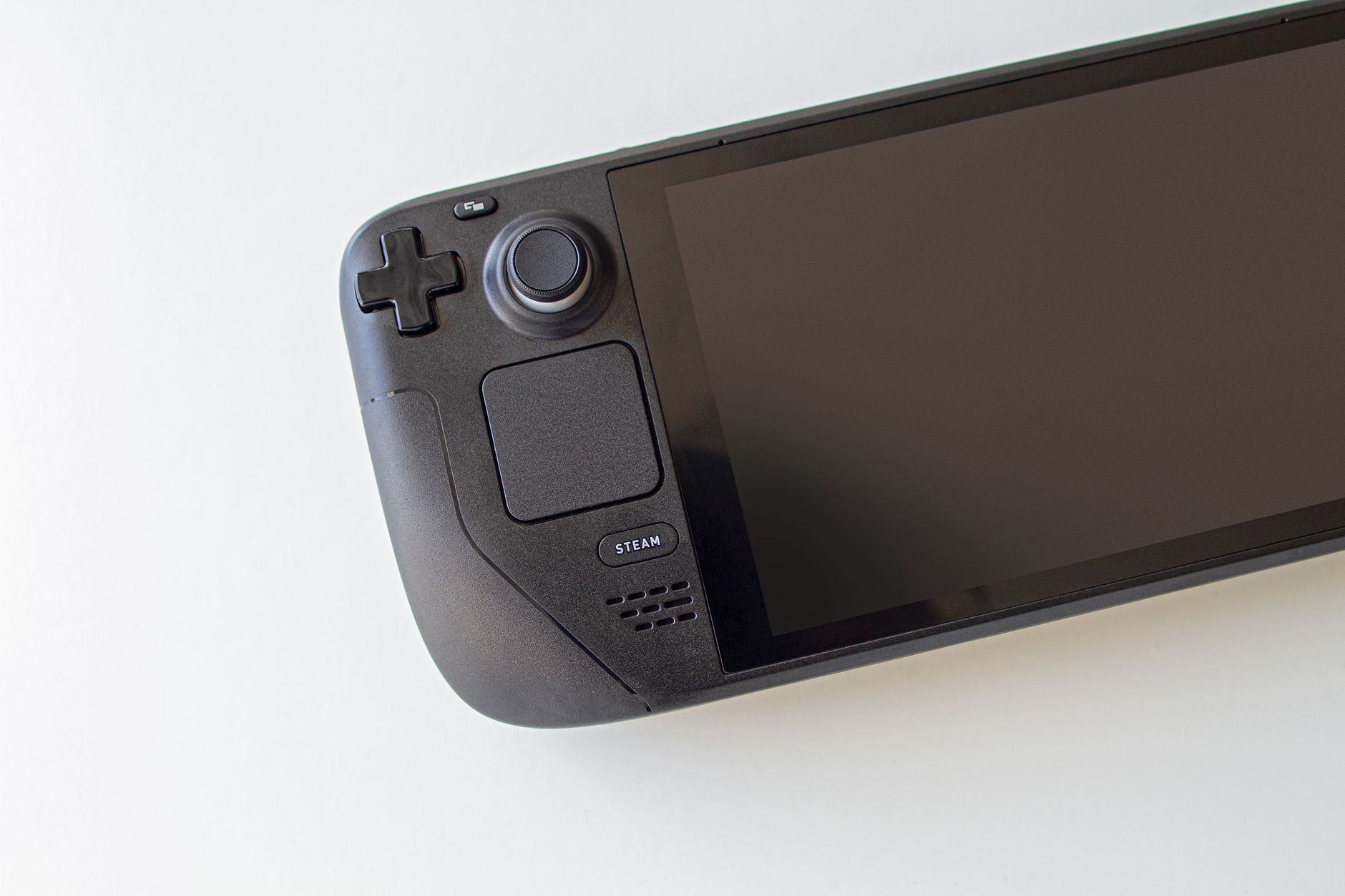
Photo by Edgar Almeida on Pexels
Ergonomics dictate how long you can play before hand fatigue sets in. The Steam Deck OLED weighs roughly 640 grams and uses deep, sculpted rear grips. Its hard plastic chassis feels secure, and the button assembly provides snappy, tactile feedback. Valve also includes dual trackpads, making menu navigation in strategy games and retro shooters much easier.
The ROG Ally X weighs 715 grams. ASUS recessed the handgrips compared to older models, but the extra weight from the massive battery is noticeable during long sessions. The shell uses a softer plastic, and the face buttons feel slightly squishier than the Deck's poppy inputs. However, the Ally X features dual USB-C ports, letting you charge the unit while connecting external accessories without needing a USB hub. If you plan to output video to a desktop display, understanding DP Alt Mode explained: what USB-C video output means helps explain how these ports handle external monitors.
Display Comparison: OLED Contrast vs. 1080p 120Hz Smoothness
The display choice represents the biggest visual divider between these two devices.
The Steam Deck OLED sports a 7.4-inch 1280x800 panel. Because each pixel emits its own light, dark areas are pitch black, and colors pop dramatically. The 90Hz refresh rate makes motion smooth, and HDR support highlights subtle light details in supported titles. Running at 800p resolution also keeps frame rates steady without straining the chip.
The ROG Ally X features a 7.0-inch 1920x1080 IPS panel running at 120Hz. While it lacks the infinite black levels of an OLED screen, it makes up for it with extra clarity and Variable Refresh Rate (VRR). VRR synchronizes the screen's refresh rate with the processor's output, smoothing out stutter when frame rates dip between 40 FPS and 60 FPS in demanding games.
Performance and Game Compatibility: SteamOS Simplicity vs. Windows 11 Versatility
Performance relies on both raw hardware and underlying software. The Ally X relies on its 8-core Z2 Extreme chip and 24GB of RAM to run modern AAA games at higher frame rates than the Steam Deck OLED. At a 15W power profile, the Ally X often pushes demanding 1080p titles into the 42–50 FPS range, where the Deck OLED might hit 35–42 FPS at 800p.
However, operating systems heavily alter the daily user experience:
- SteamOS 3: Operates like a console. You can tap the power button to instantly suspend a game, put the unit down for hours, and resume instantly. Valve's Proton compatibility layer translates Windows commands automatically for most Steam games.
- Windows 11 Home: Offers complete game library access out of the box. You can natively install Xbox Game Pass titles, Epic Games Store launcher, Battle.net, and competitive games protected by anti-cheat tools like Ricochet or Easy Anti-Cheat. The integrated Xbox Full Screen Experience gives the system a controller-friendly layout, but you still have to deal with routine Windows updates, background pop-ups, and driver updates.
Steam Deck OLED Pros
- True black levels and HDR color output
- Console-like suspend and resume functionality
- Dual trackpads for precise desktop control
- Lighter body with ergonomic rear grips
Steam Deck OLED Cons
- Incompatible with kernel anti-cheat games out of the box
- Requires smaller M.2 2230 replacement drives
- Lower top-end performance in heavy AAA titles
ASUS ROG Ally X Pros
- Runs all Windows games, launchers, and anti-cheat software
- Massive 80Wh battery keeps gameplay going longer
- Uses standard, full-length M.2 2280 NVMe SSDs
- 1080p 120Hz screen with VRR support
ASUS ROG Ally X Cons
- Heavier body induces faster hand fatigue
- Windows 11 brings background updates and maintenance tasks
- Higher price tag
Battery Life and Thermal Performance Under Heavy Load
Battery performance depends on power management. The Steam Deck OLED includes a 50Wh battery paired with an efficient processor. When running low-power indie titles, it can stretch past 6 to 8 hours. On heavy 15W AAA titles, expect roughly 2 to 3 hours before needing a charger.
The ROG Ally X packs a much larger 80Wh battery. While its 1080p screen and Z2 Extreme processor draw more power, the extra capacity balances out energy consumption. Running intensive games at higher wattages still yields around 3 to 4 hours of unplugged play. For lower-demand games, battery life stretches even further. Both devices run internal fans quietly under standard loads, keeping hot spots off the handgrips.
Price, Storage Upgrades, and Overall Value
Base pricing creates a clear dividing line. The Steam Deck OLED starts at $549 for 512GB of storage, climbing to $649 for the 1TB tier. Post-2026 component costs have pushed retail availability higher in some regions, but it remains significantly cheaper than its competitor.
The ROG Ally X occupies the top end of the market at $999.99 for 1TB of storage, though budget buyers can look at the base ROG Xbox Ally ($599.99 with a Ryzen Z2 A chip and 60Wh battery). However, the Ally X offers cheaper storage expansion paths down the line. It accommodates standard M.2 2280 desktop SSDs, which are widely available and cost less per gigabyte than the compact M.2 2230 drives required by the Steam Deck OLED.
Common Mistakes Handheld PC Buyers Make
Avoid these frequent pitfalls before picking your system:
- Buying the Steam Deck OLED for competitive online shooters: SteamOS blocks competitive titles that require kernel-level anti-cheat software (such as Call of Duty: Warzone or Fortnite). Unless you plan to install Windows manually, buy the Ally X for these games.
- Expecting desktop battery scaling: An 80Wh battery does not automatically grant double the playtime across every game. Rendering at 1080p resolution on the Ally X drains power faster than rendering at 800p on the Deck OLED.
- Ignoring OS overhead: If you dislike tweaking settings, managing background Windows notifications, or installing graphics driver packages, the Ally X may feel frustrating compared to SteamOS.
Warning: Upgrading internal storage requires unplugging the internal battery first to protect sensitive motherboard chips from short circuits.
Bottom line
Choose the Steam Deck OLED if… you primarily play games through Steam, value instant sleep/wake features, want deep black contrast, and prefer a light, cost-effective handheld.
Choose the ASUS ROG Ally X if… you rely heavily on Xbox Game Pass, play competitive anti-cheat shooters, want standard M.2 2280 storage expansion, and want higher 1080p frame rates with VRR smoothing.
FAQ
Is the ROG Ally X worth the extra price over the Steam Deck OLED?
It is worth the extra cost if you play games outside of Steam, use native Xbox Game Pass downloads, or want higher 1080p frame rates. If your library sits on Steam and you prefer pick-up-and-play ease, the Steam Deck OLED delivers better overall value.
Can the Steam Deck OLED play games with anti-cheat like Fortnite or Call of Duty?
No, not out of the box. SteamOS relies on Proton, which is blocked by several kernel-level anti-cheat systems. You would need to install Windows onto the Deck or stream those titles from a gaming PC or cloud service.
Does the ASUS ROG Ally X have better battery life than the Steam Deck OLED?
In demanding AAA games, the Ally X's 80Wh battery lasts longer (around 3 to 4 hours) than the Deck OLED's 50Wh battery (around 2 to 3 hours). However, in low-power indie titles, the Steam Deck OLED's lower-resolution screen and efficient chip consume very little power, making battery life comparable.
Which handheld is easier to use for non-technical gamers?
The Steam Deck OLED is far easier for non-technical users. SteamOS functions like a dedicated console with clean menus, automatic shader downloads, and reliable sleep/wake features. The ROG Ally X runs Windows 11, requiring occasional software maintenance and manual settings adjustments.
Sources
Facts in this article were checked against these pages on November 12, 2026:
- Steam Deck OLED vs ROG Xbox Ally X: Which Is More Powerful And Best To Buy In 2026? (youtube.com)
- Asus ROG Ally X vs Steam Deck OLED: Which gaming handheld wins? | Tom's Guide (tomsguide.com)
- Asus ROG Ally X vs Steam Deck OLED: battle of the beefed-up handhelds | Rock Paper Shotgun (rockpapershotgun.com)
- The ROG Ally X is great, but the Steam Deck OLED easily beats it in 4 key ways (pocket-lint.com)
- Asus ROG Xbox Ally X vs. Steam Deck OLED: Has the champion been dethroned? - Digital Trends (digitaltrends.com)
- Steam Deck OLED or Asus Rog Ally X (arstechnica.com)
How we researched this: this guide is based on current manufacturer information and reputable sources, listed in the Sources section above, and is updated when things change. Read our editorial policy.
Content Writter




Comments
No comments yet — be the first to share your thoughts.