
Sonos Era 100 vs. Era 300: Which Smart Speaker Should You Buy?
Deciding between the Sonos Era 100 and Era 300? Compare spatial audio, room placement, surround sound setups, and pricing to find the right smart speaker for your home.
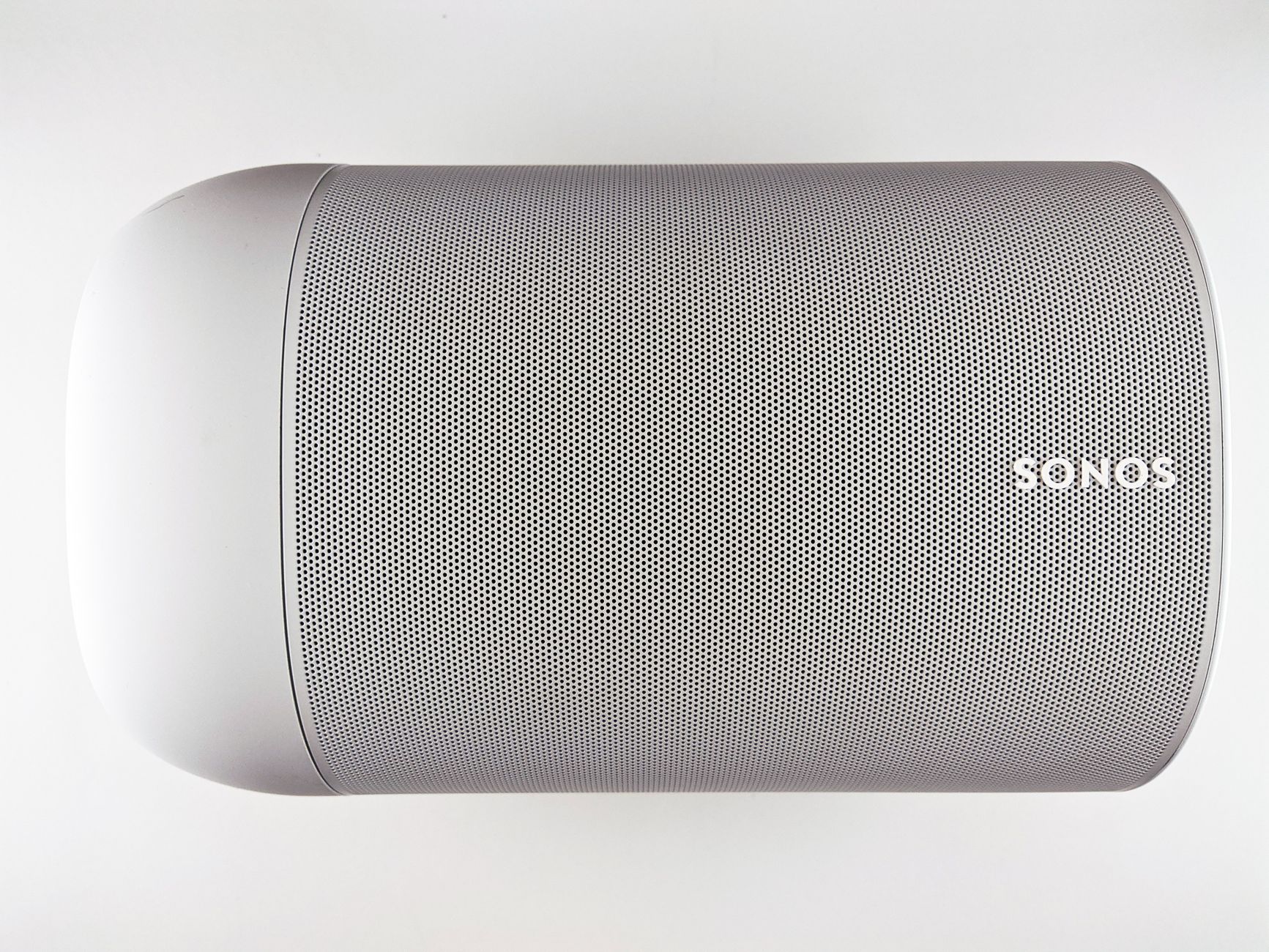
Quick answer: Buy the Sonos Era 100 ($249) if you need a compact, room-filling stereo speaker for small-to-medium spaces, desks, or entry-level surrounds. Upgrade to the Sonos Era 300 ($449) if you want dedicated Dolby Atmos spatial audio, wider room coverage, or high-end height-channel rears for a home theater setup paired with a premium soundbar.
Choosing between the Sonos Era 100 and Era 300 comes down to space, budget, and how much you care about spatial audio. Both speakers were released on March 28, 2023, modernizing the brand's connected home lineup with Bluetooth hardware buttons, USB-C connectivity, and Android-compatible Trueplay tuning.
While the Era 100 serves as the direct replacement for the legacy Sonos One, the Era 300 introduces an entirely new acoustic category for the brand. Understanding how their internal hardware, audio reflection requirements, and home theater capabilities differ will ensure you do not spend extra money on features your room cannot support.
Key takeaways
- Spatial Audio: The Era 300 includes upward and side-firing drivers for Dolby Atmos; the Era 100 delivers standard stereo sound without spatial support.
- Room Tuning: Both models support Trueplay tuning using Android micro-phones or iOS devices.
- Physical Size: Era 100 uses a compact vertical cylinder shape, whereas Era 300 requires a larger horizontal footprint for sound reflection.
- Auxiliary Input: Both require an optional Sonos Line-In Adapter ($19) or Combo Adapter ($39) to connect analog audio sources like turntables.
- Stereo Pairing: You cannot pair an Era 100 with an Era 300; stereo matching requires two identical models.
Design and Room Placement: Compact vs. Bold Footprint
The physical design of these speakers dictates where you can place them in your home. The Sonos Era 100 features a tall, compact cylindrical body that easily fits on narrow bookshelves, kitchen counters, or nightstands. It replaces the blockier profile of the legacy Sonos One with rounder edges and refined top controls.
The Sonos Era 300 is significantly larger and sports a distinct hourglass shape oriented horizontally. Because it relies on bouncing sound off side walls and ceilings, you must give it open room around its acoustic grilles.
Warning: Do not place the Era 300 inside an enclosed bookshelf or tight entertainment cabinet. Blocking the upward-firing and side-firing driver arrays destroys its spatial audio presentation and muffled output performance.
Both models feature updated top panel controls, including a recessed volume touch slider, dedicated track skip/replay buttons, a capacitive voice control toggle, and a hardware microphone switch on the back for privacy.
| Feature / Spec | Sonos Era 100 | Sonos Era 300 |
|---|---|---|
| MSRP | $249 (often $199–$219 on sale) | $449 (periodic discount sales) |
| Acoustic Architecture | 2 angled tweeters, 1 midwoofer | 4 tweeters, 2 woofers |
| Amplifiers | 3 digital class-D amplifiers | 6 digital class-D amplifiers |
| Dolby Atmos / Spatial Audio | No | Yes (Apple Music, Amazon Music) |
| Connectivity | Wi-Fi 6, Bluetooth, USB-C Line-In | Wi-Fi 6, Bluetooth, USB-C Line-In |
| Trueplay Support | iOS & Android | iOS & Android |
Sound Performance and Spatial Audio Compared
Photo by Pew Nguyen on Pexels
Underneath the outer shell, the two speakers rely on fundamentally different acoustic designs. The Era 100 packs two angled tweeters and one enlarged midwoofer driven by three digital amplifiers. This setup creates wide stereo separation and deep bass from a single compact enclosure, delivering a warm, detailed tone suited for small to mid-sized rooms.
The Era 300 houses six digital amplifiers powering four tweeters (including an upward-firing driver for height channel effects and directional side drivers) alongside two woofers. This complex driver array enables the Era 300 to stream 3D Dolby Atmos spatial audio tracks from supported services like Apple Music and Amazon Music Unlimited.
While the Era 100 delivers impressive clarity for general music playback, it cannot play Dolby Atmos tracks. If you want immersive spatial audio where vocals, instruments, and overhead effects sound placed around your room, the Era 300 is required.
Sonos Era 100
Pros
- Compact footprint fits almost anywhere
- Rich stereo separation from a single box
- Lower price point for multi-room setups
Cons
- No support for Dolby Atmos or spatial audio
- Less bass authority in large open-concept rooms
Sonos Era 300
Pros
- Outstanding spatial audio playback with height channels
- Powerful sound output suitable for large living areas
- Advanced room reflection creates immersive soundstages
Cons
- Higher price point ($449)
- Bulky hourglass footprint requires careful room placement
Connectivity: Line-in, Bluetooth, and Wi-Fi Flexibility
Both speakers offer identical modern connectivity options, bringing welcome upgrades over older Sonos hardware. Each model supports Wi-Fi 6 for low-latency multi-room streaming, alongside a dedicated physical Bluetooth button on the back for quick pairing when off your primary network. If you struggle with wireless dropouts across desktop or mobile devices, managing network settings or checking dedicated hardware setups can help eliminate transmission issues—much like managing Bluetooth audio delay on PC setups.
Auxiliary audio inputs are handled via a rear USB-C port on both models, allowing you to connect hardware like turntables, CD players, or external DACs.
Tip: Neither speaker comes with an auxiliary cable or adapter in the box. Connecting an analog device requires the official Sonos Line-In Adapter ($19) or the Sonos Combo Adapter ($39), which adds an Ethernet port alongside the 3.5mm audio jack.
Using Them as Home Theater Surrounds
Both the Era 100 and Era 300 act as wireless rear surround speakers when paired with current soundbars such as the Sonos Arc Ultra, Sonos Arc, Sonos Beam (Gen 2), or Sonos Ray. They can also work alongside the Sonos Sub (Gen 3) or Sub Mini.
However, choosing between the two for home theater depends on your main soundbar and room layout:
- Sonos Era 100 as rears: Best paired with mid-tier or entry soundbars like the Beam (Gen 2) or Ray. They add wide surround channels and clean background sound effects without overwhelming smaller TV spaces.
- Sonos Era 300 as rears: Best paired with flagship soundbars like the Sonos Arc Ultra or standard Sonos Arc. In this configuration, the Era 300 unlocks two dedicated upward-firing height channels per speaker, delivering true 7.1.4 Dolby Atmos surround decoding.
If spatial constraints prevent ideal placement, the Era 300 can even be wall-mounted upside down high on a wall. The speaker detects this orientation and flips its internal audio processing so up-firing drivers direct height channels straight toward your seating area.
Common Mistakes to Avoid
- Expecting Dolby Atmos on the Era 100: Do not buy the Era 100 expecting spatial audio; spatial decoding is strictly exclusive to the hardware array in the Era 300.
- Attempting to plug 3.5mm cables directly into USB-C: The USB-C port will not recognize standard third-party cables directly without an active adapter like the Sonos Line-In or Combo Adapter.
- Mixing speaker models for stereo or surround pairing: You cannot create a stereo pair by matching an Era 100 with an Era 300, nor can you mix an Era speaker with an older Sonos One. Stereo pairs and rear surround pairs require matching models.
- Over-specifying rears for basic soundbars: Buying a pair of Era 300s to use as rear surrounds with an entry-level soundbar like the Sonos Ray wastes money, as the Ray cannot pass spatial surround metadata to height channels.
Price-to-Performance Breakdown
At $249, the Sonos Era 100 offers exceptional value for multi-room audio installations. Its internal midwoofer update brings deeper low-end response than the legacy Sonos One, making it ideal for bedrooms, kitchens, home offices, or secondary surround setups.
At $449, the Sonos Era 300 costs nearly double the Era 100. The price premium pays for custom directional driver arrays, dedicated spatial audio processing, and spatial surround integration. If you do not actively listen to Dolby Atmos music tracks or use a flagship Dolby Atmos soundbar setup, the extra cost of the Era 300 offers diminishing returns.
Bottom line: Choose the Sonos Era 100 if you want an affordable, compact smart speaker with crisp stereo sound, easy placement, and Bluetooth flexibility for daily listening or secondary home theater rears.
Choose the Sonos Era 300 if you want immersive Dolby Atmos spatial audio, have a larger open room to fill, or are pairing rears with a flagship soundbar like the Sonos Arc Ultra to create a complete spatial surround system.
FAQ
Is the Sonos Era 300 worth the extra money over the Era 100?
The Era 300 is worth the extra cost if you frequently listen to Dolby Atmos spatial audio tracks on services like Apple Music or want complete 7.1.4 height-channel surrounds for high-end home theater setups. If you simply want clear stereo background music in smaller rooms, the Era 100 delivers better price-to-performance value.
Can you pair a Sonos Era 100 with an Era 300 as a stereo pair?
No. Sonos requires two identical speaker models to form a stereo pair. You must use two Era 100s or two Era 300s to create paired left/right stereo channels.
Does the Sonos Era 100 support spatial audio or Dolby Atmos?
No. The Era 100 features two angled tweeters for stereo separation, but it lacks the upward-firing drivers and internal processing required to decode or project Dolby Atmos spatial audio.
Which speaker is better for surround sound rear speakers with a Sonos Arc?
The Sonos Era 300 is the ultimate rear surround speaker for the Sonos Arc or Arc Ultra because it activates dedicated height and side channels for Dolby Atmos movies. However, if your room layout restricts placement or budget is limited, a pair of Era 100s still functions effectively as standard rear surrounds.
Can I connect a turntable to both the Era 100 and Era 300?
Yes, both models feature a rear USB-C port for external analog audio line-in. To connect a turntable, you must use the optional Sonos Line-In Adapter ($19) or Sonos Combo Adapter ($39), along with a turntable that has a built-in or external phono preamp.
Sources
Facts in this article were checked against these pages on November 4, 2026:
- Which Sonos Speaker Should You Buy? - Consumer Reports (consumerreports.org)
- Sonos Era 100 vs Era 300 Stereo Pair Review: Sound, Features & 2025 Pricing Comparison (redsharknews.com)
- Sonos Era 100 vs Sonos Era 300: Which is better for you? (trustedreviews.com)
- Sonos Era 100 & Era 300 Review – Audio Advice (audioadvice.com)
- Sonos Era 100 and Era 300 Speakers Review - Residential Systems (residentialsystems.com)
- Sonos Era 300 Review: Still Worth It in 2026? (smarthomesounds.co.uk)
How we researched this: this guide is based on current manufacturer information and reputable sources, listed in the Sources section above, and is updated when things change. Read our editorial policy.
Content Writter




Comments
No comments yet — be the first to share your thoughts.